Automatic Webhook Error Notification
Last updated: September 3, 2025
What are webhook error notifications?
Our system automatically monitors all webhook deliveries and sends email notifications when webhook endpoints return error responses. These notifications help you stay informed about potential issues with your webhook integrations without having to constantly monitor your webhook logs.
When do webhook error notifications get sent?
You will receive an automatic email notification when:
Your webhook endpoint returns any non-2xx HTTP status code (such as 400, 403, 500, 503, etc.)
Your webhook URL is unreachable or doesn't exist
Your webhook endpoint experiences any other delivery failure
Important: To prevent email spam, these notifications are limited to once per day, regardless of how many webhook failures occur during a 24-hour period.
How to troubleshoot webhook errors
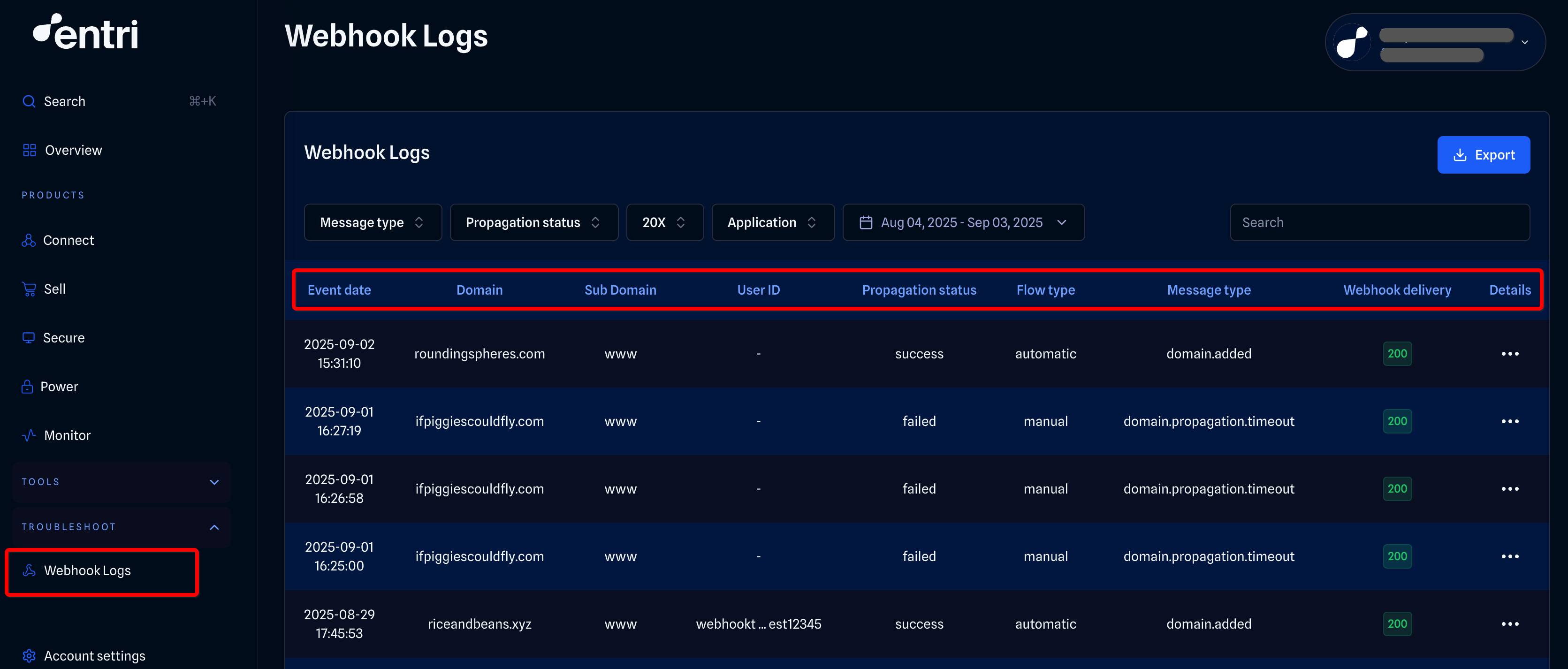
Step 1: Check your webhook logs
Log into your dashboard
Navigate to Webhooks > Logs
Review recent webhook deliveries for error codes and response details
Step 2: Verify your endpoint
Ensure your webhook URL is accessible and responding
Test your endpoint manually to confirm it's working
Check that your server can handle the webhook payload format
Step 3: Review error details
Look for specific error codes in the webhook logs
Check the response body for detailed error messages
Verify that your endpoint is returning appropriate status codes
What the notification email contains
The automatic notification email will include:
Confirmation that webhook delivery failures occurred
Reference to check your webhook logs for detailed information
AppId where the errors were detected
Next steps when you receive a notification
Don't panic - Receiving one notification doesn't mean your webhooks are completely broken
Check the logs - Review your webhook logs in the dashboard for specific error details
Debug your endpoint - Use the error codes and messages to identify the root cause
Test and fix - Make necessary corrections to your webhook handling code
Monitor - Watch for the next day's notification to confirm the issue is resolved
Need additional help? Contact our support team through the Entri dashboard or visit our help center for more resources.